The time has come, the Walrus said,I was a software engineer on UNIX systems for fourteen years. When I retired in 2004, I switched over to using Windows on my home computer. Windows XP was great. All of the software I wanted to use worked fine on it and life was good. When Windows Vista was released, I simply ignored it and continued happily on my way with XP. Then one day, due to a death in my family (my computer), I was forced to buy new hardware. Fortunately, at that time Windows 7 was available, so I started using it and life continued to be good. Windows 8 came and went while I happily continued using Windows 7.
To talk of many things: Of switching now to Linux,
Putting Windows in the wings.
- (Nod to Lewis Carroll)

12 January 2019
Switching from Windows to Linux

19 February 2016
Creating a Tiling 3D Geometric Pattern Using Inkscape
Some time during the latter half of 2015 I sketched out the following design which I wanted to create as a pattern.
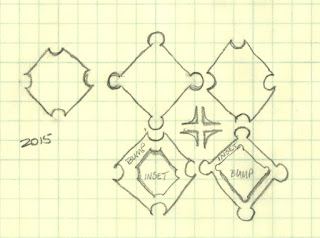
I finally got around to working on it at the end of January 2016. Creating the basic shapes in Inkscape was very easy. The fun came in when I started messing about with various filters to see what kinds of effects I could get. After a lot of experimentation I eventually ended up with this design.

In this tutorial I explain how to create this design using the simplest steps I can think of. My actual process was much more complicated and involved a lot of trial and error. (Please note: This tutorial is intended for instructional purposes only. I am not granting permission for anyone to use or publish this design in any form.)

I finally got around to working on it at the end of January 2016. Creating the basic shapes in Inkscape was very easy. The fun came in when I started messing about with various filters to see what kinds of effects I could get. After a lot of experimentation I eventually ended up with this design.

In this tutorial I explain how to create this design using the simplest steps I can think of. My actual process was much more complicated and involved a lot of trial and error. (Please note: This tutorial is intended for instructional purposes only. I am not granting permission for anyone to use or publish this design in any form.)
18 August 2015
Creating the Trojan Zebra with Inkscape
The intent of this article is to show my creative flow with Inkscape as opposed to giving a detailed step-by-step tutorial, which would be difficult with anything more than a simple design.
In June of 2015 I had the idea of drawing a zebra with a hair headdress instead of a mane – a kind that would look like the horsehair brush on an ancient Greek helmet. (My thought was, the zebra was bald and had to wear an artificial mane to keep up appearances.) I drew a quick sketch to save the idea and finally got around to working on it in August.

In June of 2015 I had the idea of drawing a zebra with a hair headdress instead of a mane – a kind that would look like the horsehair brush on an ancient Greek helmet. (My thought was, the zebra was bald and had to wear an artificial mane to keep up appearances.) I drew a quick sketch to save the idea and finally got around to working on it in August.

10 April 2015
How to Create Tiling Patterns in Inkscape – The Grid Methods
Patterns that tile can be fun to create and are useful for filling large spaces, like fabric, comforter covers, rugs, and so forth. There are many different methods that can be used to create these sorts of patterns. Herein I describe some simple methods that I think of as the grid style and which I used to create these summer-themed tiling patterns.


10 July 2014
A Painting Tutorial by Evelyne Schulz
Many months ago I discovered Evelyne Schulz on Twitter due to a GIMP-related post. I immediately loved her artwork and, after some correspondence, she graciously agreed to write a tutorial about how she creates her digital paintings in GIMP. What follows is what she wrote about how she created her Warrior painting, with editing and inclusion of a description of the Palette Editor by me.

21 May 2014
How to Import EPS Files into Inkscape
While browsing the shelves of a local
discount book store, I stumbled upon an interesting pattern book
called Drip.Dot.Swirl. by Von Glitschka,
published by HOW Books in 2009. Being a bit of a pattern nut and
seeing a lot of patterns in the book that I liked, I was about to buy
the book when I noticed that the DVD that was supposed to be in the
back of the book was missing. The DVD contains editable vector files,
swatch libraries, and tutorials and is at least half the reason for
buying the book. Being undaunted, after a quick search online I found a copy of the book and had it in my hands within a week.

Drip Dot Swirl: 94 Incredible Patterns for Design and Illustration
I happily popped the DVD into the drive and grabbed the first vector file, only to discover that all the
files are in encapsulated PostScript (EPS) format and plain vanilla Inkscape is completely unable to load them. Fine. Back to the internet. After poking around for a while I finally found some useful
instructions at InkscapeForum.com. Here's a quick step-by-step on how
to set up Inkscape so that it can read EPS files. (Please note that these instructions are for Windows 7. For later versions of Windows, the way to get to your environment variables will probably be slightly different.)
23 April 2014
Four Ways to Draw a Border Around a Selection in GIMP
I was recently asked for a quick way to
draw a border three pixels wide around the inside edge of a rectangular selection on top of an in-progress graphic design. Two methods immediately came to mind and a third occurred to me later that afternoon. I discovered a fourth method while writing this article.
Method 1
The most obvious method to use is
Select > Border [1], which opens the Border Selection
dialog [2]. This dialog contains three adjustments.
 |
| Border Selection Dialog |
Subscribe to:
Posts (Atom)